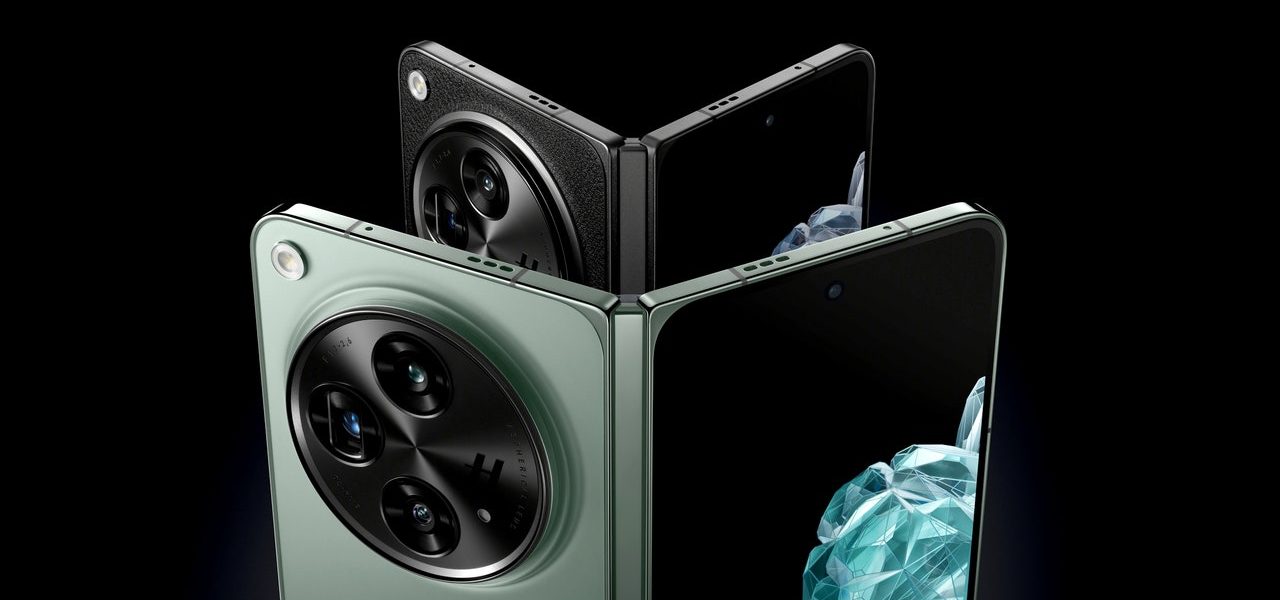

The OnePlus Open: A Third-Generation Foldable (Oppo Find N3) and a Canvas for Orthogonal Android 13
Although the Open is a first for the OnePlus brand, it’s pitching the device as a collaborative project with parent company Oppo. The open is a third- generation foldable, meaning it will be sold as the Oppo Find N3 in the companys home market. But OnePlus is keen to emphasize the OnePlus-y inclusion of an alert slider on the foldable, which it sees as one of the brand’s signature features.
The firmer hinges on the Pixel Fold and Z Fold 5 will hold the phone open at almost any angle between zero and 180 degrees, which can come in handy. In use, I didn’t have any problem with the Open’s reduced flexibility, and it’s nice not feeling like I have to pry it open every time I want to use the inner screen. OnePlus says the hinge has been tested to withstand one million folding cycles, which is a lot more than the 200,000 folds advertised by the Pixel Fold and Z Fold 5.
The OnePlus Open has a 6.31-inch front screen that’s practically normal looking. It’s not awkwardly narrow like the front screen on Samsung’s Galaxy Z Fold5, and it’s not short and wide like the outer face of the Google Pixel Fold. The Open feels closer to a phone than a device, as the svelte body makes it feel closer to a normal phone. For reference, the iPhone 15 Pro Max is 8.25 mm, the Pixel Fold is 12.1 mm, and the Fold5 is 13.4 mm. The Open is also one of the lightest folding phones in its class at just 239 grams. The Fold5 and the Pixel Fold are both 283 grams.
For software, the device runs OxygenOS 13.2, which is based on Android 13 and which OnePlus has equipped with some tweaks to make it work better on the Open’s larger screen. There is a workspace at the bottom of the screen that offers access to files, favorites and recent apps, as well as the ability to run multiple apps side by side.
OnePlus’s solution to the problems some apps can have when you try to run them in the weirder aspect ratios of foldables is a feature it calls Open Canvas. This lets you tile each of your apps on the screen in a way that attempts to keep them at a usable aspect ratio at the expense of losing some visibility, rather than resizing and stretching them at the risk of creating glitches.
The more pedestrian phone stuff can be done well by the OnePlus Open. It was built with a 2nd Gen Chipset and 16Gb of RAM for faster daily performance and easier handling of processor-intensive tasks. The 8 Gen 2 seems to run cooler than either of the 8 Gen 1 models and has better battery life.
The Open has a dual camera setup on its rear consisting of a main camera and a telephoto camera with an optical zoom. There’s support for recording in Dolby Vision HDR at up to 4K 30fps, or if you don’t care about HDR, it’ll do 4K 60fps. The rear cameras are joined by a pair of selfie cameras powered by 20- and 32-megapixel sensors and which sit within a pair of hole-punch notches.
There I was in the second row at the launch event. While other journalists were typing away at the keynote, I whipped out the new folding phone from the Chinese company that makes good mid-priced mobile devices, the OnePlus Open, which was about to start.
I usually use my laptop in front of me to take notes, and to keep my ears open as my team members communicate with me. I was able to see three apps at once on the large 7.82-inch screen with the help of the OnePlus Open’s multitasking features and the fact that both slack and chrome sat next to each other. I was able to post a stream of tweets (Xs?) containing photos pretty easily while moving back to the other apps to respond to my colleagues in Slack and grab URLs from Chrome.
Galaxy Folds Revisited: A Surprisingly Good First Attempt: The Unusual Fate of the Exterior Screen
Samsung is on its fifth generation of Galaxy Fold phones, and while it has continued to refine the experience with every iteration, it has largely stuck with the same size and shape. This year, I believe that there are better folding phone designs being created by companies like OnePlus and Google.
In the first few days of using the phone, I often forgot I could crack it open and make use of the much larger internal display. That’s not a bad thing—in reality, with booklike foldables, you’re going to be using the exterior screen most of the time, switching to the larger display when you want to multitask, play a game, or watch a video. An exterior screen that feels like the screen of a normal phone is exactly what we want.
The only hardware gripe I have is with the massive camera module on the back. My hands are big, and my index finger frequently sits over the bump. I’m constantly cleaning the camera glass, and that doesn’t feel good. This might not be much of a problem if you have smaller paws. At least the whole thing looks gorgeous, especially in the Emerald Dusk color.
Source: OnePlus Open Review: A Surprisingly Good First Attempt
The OnePlus Open, a one plus open review, is a pop socket to prop your finger on the top of the OnePlus range
It feels like the company spared no expense in its construction of the OnePlus Open as you begin to hand it over. It feels luxe, and OnePlus even brought back the multi-position Alert Slider on the side of the phone, which lets you to switch between silent, vibrate, and ring with a satisfying flick.
But the Galaxy Z Fold 5 and Google Pixel Fold are each just $100 more and are IP rated for full-immersion water resistance. Wireless charging, which is an optional feature on high-end phones, is also included.
The camera “bump” on the Open is more of a mountain. It’s a raised circle that occupies over a third of the back panel, with three camera lenses and a subtle Hasselblad H for style. OnePlus is making a lot of noise about its design, which is meant to catch the light like a CD, and there’s a gap between the lenses and cover glass that’s supposed to remind you of the face on a luxury watch. It certainly commands attention, but I found its best use is as a kind of pop socket to prop the phone on my finger when I was using it one-handed.
On the inside, the display measures 7.82 inches, with a 2440 x 2268 resolution. It’s an LTPO panel, too, with variable refresh rates from 120Hz all the way down to 1Hz, and OnePlus claims the screen can hit a peak brightness of 2,800 nits in high brightness mode. That is very bright, and most flagship phones top out around 2,000 nits.
I saw it ramp up in the sunlight, but I didn’t know if it went all the way up to the top of the range, but the screen was readable on a bright day. It maintained that brightness longer than the Pixel 8 or iPhone 15 Pro, both of which tend to darken after a few minutes to prevent overheating.
Source: OnePlus Open review: right size, wrong price
The OnePlus Open is a Nearly Creepless Foldable Battery Screen Camera (Review: Right Size, Wrong Price)
The crease on those devices does not bother me since it is pretty much gone when you look at them straight on. But the crease does bother some people, and the OnePlus Open is proof that a nearly creaseless foldable is possible.
The hinge of the Open is a bit less stiff than the alternatives. You need to open it at least 45 degrees to make it stay open, otherwise it will shut down. The same thing happens if the temperature is more than 135 degrees.
For what it’s worth, I haven’t encountered any serious problems in the last week that I’ve been using the phone, and I haven’t been overly cautious with it. I don’t see any signs of dust intrusion or problems with the display on the phone, which stands up just fine in a little rain.
OnePlus has included some measures to reduce the chances of disaster, like drainage holes in the hinge so that water can exit quickly. Some internal components include a dispersive water-resistant treatment, too. There’s a case included in the box, which is nice, but it’s a flimsy sort of frame for the front panel and cover for the back panel, so I wouldn’t trust it to provide any additional protection.
Source: OnePlus Open review: right size, wrong price
OnePlus Open Review: Wirelessly Charging and Multitasking on a Single-View-Foldable Battery, Right Size, Wrong Price
I had no problem getting through a full day used on the Open by a very comfortable margin, which consisted of four hours of screen-on time, and about 45 minutes of Pocket City 2, which drained the battery down to 38 percent by the end of the day. I spent my time with the Open’s always-on display enabled full time, which didn’t come with any serious battery life penalties.
Fast wired charging is still very much OnePlus’ deal, and the Open supports 67W charging with the included cable and charging brick — you’ll still get fast charging if you swap out the proprietary cable or brick, but you need both to reach the full 67W. You’ll get a full charge in well under an hour, which means you can skip the charging overnight and power up while you go about your morning routine, if you want.
The lack of wireless charging is a real shame, and is on the Open spec sheet. Almost every other phone that costs more than $700 in today’s dollars includes wireless charging. Some people will be perfectly happy with fast wired charging, but a phone at this price really should include convenience features like wireless charging.
It’s not quite as flexible as Samsung’s four-app multitasking, but it’s better than the split screen or nothing that the Pixel Fold offers. There is a folder of recent documents as well as recent applications that you can hide in the bottom right corner of the screen. There’s also support for floating windows, which you can position anywhere on the screen, resize to your taste, and minimize to a tab at the side of the screen so you can easily fetch them again.
You can dictate how the individual apps display on the main screen in settings. Switching to 16:9 makes room for another app on the unoccupied portion of the screen without cutting off the first one. It’s a little inelegant, and I prefer the way the Galaxy Z Fold 5 resizes apps as you go to fit everything in one view.
Source: OnePlus Open review: right size, wrong price
The OnePlus Open Camera System: Color Jitter and Hasselblad Technology, with a Matter-of-Field Flashing Battery Camera
Maybe it’s because I just switched from a Pixel phone, but the thing I’m appreciating the most about the OnePlus Open’s camera system is its color rendering. The hardware is respectable, including a stabilized 48-megapixel main camera, 64-megapixel 3x telephoto with optical image stabilization, and a 48-megapixel ultrawide.
The brands come with Hasselblad branding and the companies say that it influences the camera’s color science. It is not afraid of embracing warm tones, and it handles lighting a little better than most phones.
I wish it handled moving subjects better than it does for static scenes. The camera tends to use too-slow shutter speeds in moderate and dim light, so you end up with a lot of photos where your subject looks soft. Try to get a low-light shot of a moving subject.
Portrait cutouts are usually convincing, with the stray error here and there. If your subject is struggling with motion and you don’t want to move, the 6x lossless crop zoom mode is just fine. I took some pictures from the stands at an NHL game, and it couldn’t manage a sharp shot of any of the players as they took the ice, even though they were illuminated with a bright white spotlight. One of my shots has some unusual artifacts where it looks like the system tried to piece together the moving subject from multiple frames and couldn’t quite get it right.
Source: OnePlus Open review: right size, wrong price
Oneplus-Open-Review-Foldable Battery Screen Camera Price (OnePlus Open Review): Measuring Video Quality with the Under-Display Camera on the Z Fold 5
There are two cameras on the front screen that are used for selfies and a larger one on the inner display for video calls. The under-display camera on the Z Fold 5 is more attractive to me than the camera tucked into the corner of the display. It’s only a problem if you can’t locate it because it’s illuminated by a flashing ring when you turn the camera on.
You will need to drop down to 1080p to use the more robust stabilization mode, which helps smooth out motion from walking, though the main camera can be used in 4K 30 / 60p. The front-facing camera with the cover screen records up to 4k video, but there is a slight wobble if you move the camera slightly. That’s not something I noticed with the main camera, and if you’re going to record selfie video, your best bet is to unfold the phone and use the rear camera with the image preview on the cover screen — one of the best tricks a folding phone can do.
Source: OnePlus Open review: right size, wrong price
How many times do you need to sign a user agreement to use Smart Devices? An analysis of four different smart phone models in the Galaxy Z Fold 5
If you are not a Red Cable Club member, you can appreciate the device’s shape. It splits the difference between the long and skinny Z Fold 5 and the wider Pixel Fold and comes up with something better than either. It feels like a regular phone when it’s closed because it’s lighter. Solid performance, high-quality screens, and a nice camera system are all supported by it. But at $1,700? The phone with a foldable design is priced at $1,810 when it’s available. That is very difficult.
The company will tell you that you can trade in any old phone for the price of the new one. — for a quick $200 discount. That’s not an introductory deal, either; the company says it will offer this discount throughout the life of the phone. That is great, but why not just increase the phone’s price? And it’s not as if OnePlus’ competitors are shy about offering promotional pricing. If you trade in an old phone for a cracked one, you can get $300 back on the newGalaxy Z Fold 5.
Every smart device has a laundry list of terms and conditions that you must agree to before you can use it. It’s impossible for us to read and analyze every single one of these agreements. But we started counting exactly how many times you have to hit “agree” to use devices when we review them since these are agreements most people don’t read and definitely can’t negotiate.